Quickstart
Get the data
To keep things simple and reproducible, let’s work with the reference E. coli genomes K12 and Sakai:
## download ecoli genome Sakai
wget \
 https://ftp.ncbi.nlm.nih.gov/genomes/all/GCF/000/008/865/GCF_000008865.2_ASM886v2/GCF_000008865.2_ASM886v2_genomic.fna.gz \
 -O ecoli_sakai.fna.gz && \
gzip -d ecoli_sakai.fna.gz

## download ecoli genome K12
wget \
 https://ftp.ncbi.nlm.nih.gov/genomes/all/GCF/000/005/845/GCF_000005845.2_ASM584v2/GCF_000005845.2_ASM584v2_genomic.fna.gz \
 -O ecoli_k12.fna.gz && \
gzip -d ecoli_k12.fna.gz
Run the script
This script is designed to:
Perform whole genome alignment between FASTAs with nucmer.
Filter alignments by length and identity
Plot these alignments in circular visualisation with ggbio.
It is an automation of the methods described by Taylor Reiter at https://taylorreiter.github.io/2019-05-11-Visualizing-NUCmer-Output/.
# run plot_nucmer
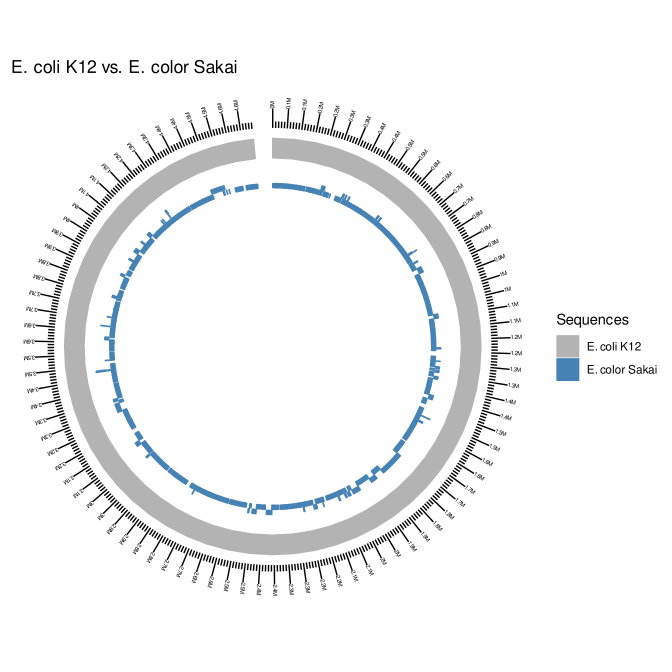
plot_nucmer --subject ecoli_k12.fna --sprefix "E. coli K12" --query ecoli_sakai.fna --qprefix "E. color Sakai"
This will create all the required data for the plot, including the Rscript plot_nucmer.R in the running directory. See the created plot:
Tip
Click in the image for zoom.
Takeaway notes
Inside the working directory, after the script runs, all the files required to recreating the plot will be available, including the Rscript used for the job. The plot is written in SVG so users can further edit it in software like inkscape to their heart’s content.